Patching X10SAE bios to fix Win11 compatibility
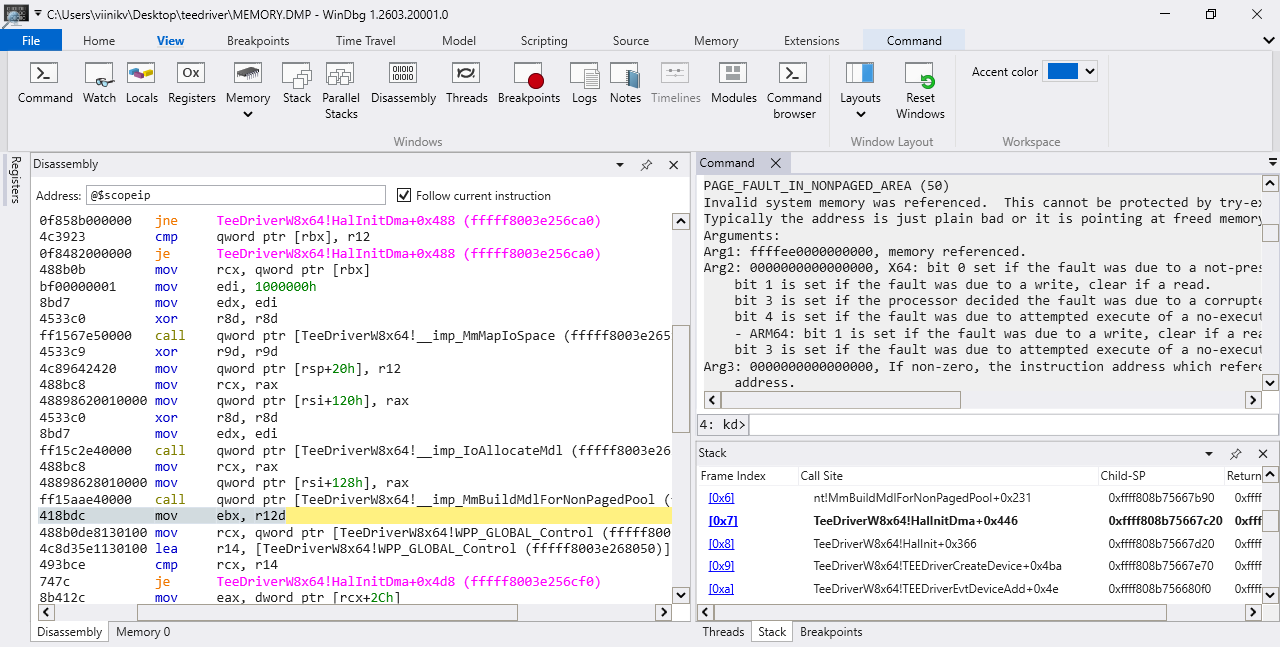
WinDbg. Interestingly this image is 112kB as 80% lossy webp but 46kB lossless.
Windows 10 started crashing on my Supermicro X10SAE (Intel Haswell, 2013) motherboard around version 20H2 (2020). A clean install would blue screen with “Page fault in nonpaged area” around the time it installed graphics drivers. The crash memory dump showed a stack trace in TeeDriverW8x64, which is the Intel MEI (Management Engine Interface) driver.
Searching online would find similar reports from people with EVGA and MSI Z97 motherboards (mine was C226 from the same era). Some cases were fixed by upgrading or downgrading the bios, or by disabling the Intel MEI device or MEIx64 service in Windows. I was already on the latest bios, and a beta bios suggested by Supermicro support didn’t help.
Disabling the device was slightly annoying as the computer would blue screen at boot even in safe mode. Luckily I could uninstall the problematic driver using System restore from Startup recovery, then boot without internet connection and disable the device (Other devices/PCI Simple Communications Controller, VEN_8086&DEV_8C3A) in Device manager. This fixed the blue screen problem and the system has worked fine since then (including Windows 11 with this fix and the standard hacks for unsupported hardware).
Motivation
This was not a very satisfying fix. Why would this random Windows update cause a blue screen? What was common with these Z97 boards and mine? A bios update fixing this for some people was a good sign, because hacking the bios seemed totally doable, unlike if the problem was with the hardware or Intel Windows drivers. Spending a couple of weeks debugging this now would also save me 5 minutes every time I reinstalled Windows every couple of years.
Memory dump in WinDbg
I found an HP sp90166.exe that has TeeDriverW8x64.sys with some debug symbols, making my life easier. Running !analyze gives:
PAGE_FAULT_IN_NONPAGED_AREA (50)
Invalid system memory was referenced.  This cannot be protected by try-except.
Typically the address is just plain bad or it is pointing at freed memory.
Arguments:
Arg1: ffff938000000000, memory referenced.
Arg2: 0000000000000000, X64: bit 0 set if the fault was due to a not-present PTE.
        bit 1 is set if the fault was due to a write, clear if a read.
        bit 3 is set if the processor decided the fault was due to a corrupted PTE.
        bit 4 is set if the fault was due to attempted execute of a no-execute PTE.
        - ARM64: bit 1 is set if the fault was due to a write, clear if a read.
        bit 3 is set if the fault was due to attempted execute of a no-execute PTE.
Arg3: 0000000000000000, If non-zero, the instruction address which referenced the
        bad memory address.
Arg4: 0000000000000006, (reserved)
Address ffff938000000000 looks fine. The stack trace is:
nt!KeBugCheckEx
nt!MiZeroFault+0x210ed9
nt!MiUserFault+0x392
nt!MmAccessFault+0x13b
nt!KiPageFault+0x37e
nt!MI_READ_PTE_LOCK_FREE
nt!MmBuildMdlForNonPagedPool+0x231
TeeDriverW8x64!HalInitDma+0x446
TeeDriverW8x64!HalInit+0x366
TeeDriverW8x64!TEEDriverCreateDevice+0x4ba
TeeDriverW8x64!TEEDriverEvtDeviceAdd+0x4e
Ok, so it crashes in MmBuildMdlForNonPagedPool inside HalInitDma. Let’s take a look.
Decompiling in Ghidra
Here is the crashing call to MmBuildMdlForNonPagedPool.
ret = MmMapIoSpace(addr, 0x1000000, 0);
ret = IoAllocateMdl(ret, 0x1000000, 0, 0);
MmBuildMdlForNonPagedPool(ret);
MmMapIoSpace maps 16 MiB of physical memory starting at addr to process accessible virtual memory, IoAllocateMdl allocates enough space to describe this mapping, and MmBuildMdlForNonPagedPool fills the mapping description.
Weird that it crashes at the last call, it would seem the safest of the three. Seeing the intermediate values like addr and ret would be handy. The code also called some dynamically loaded functions which I wanted to identify. Maybe I could deduce these with enough time with the memory dump, but as reproducing the crash was extremely easy (boot!), stepping though running (assembly) code would be the easier option.
Live kernel debugging in WinDbg
Microsoft has a nice guide for debugging Windows drivers. The debugger runs on a seconds PC and connects to the target over the network. I needed to use the “Initial Break” option, because otherwise I would have to race to Break it before it crashed. Then, inside the debugger, after loading debug symbols, I could run bm TeeDriverW8x64!HalInitDma(Set Symbol Breakpoint) and have access inside the function I wanted.
The problem was obvious: MmMapIoSpace returned NULL, which was then passed on without checks to IoAllocateMdl, which would cause MmBuildMdlForNonPagedPool to crash. The addr argument to MmMapIoSpace was 0x41500741, which seemed strange. Could it really be unaligned like that? It also wasn’t part of any hardware reserved memory region. Where was this address coming from? For that we are back to Ghidra. Here is a simplified version of our function with the dynamic imp_Wdf* functions filled in:
void HalInitDma(dev) {
    target = imp_WdfDeviceGetIoTarget(dev);
    buf = imp_WdfMemoryGetBuffer();
    buf.a = "CieA";
    buf.b = "MSD_";
    buf.c = 0xf7b327adaf13a34f93c9eefd1f9d6ac7;
    ...
    buf2 = imp_WdfMemoryGetBuffer();
    imp_WdfIoTargetSendIoctlSynchronously(target, 0x32c004, buf, buf2);
    if (buf2.addr != 0) {
        ret = MmMapIoSpace(buf2.addr, 0x1000000, 0);
        ret = IoAllocateMdl(ret, 0x1000000, 0, 0);
        MmBuildMdlForNonPagedPool(ret);
    }
}
So we prepare a buffer, call an Ioctl and get a buffer back that has our address. I tried stepping though the Ioctl call to see what Ioctl 0x32c004 was, but quickly gave up. For all I knew, it might just push a command to a queue and pop a response back and I would be none the wiser what the actual command was (it didn’t, stepping though would have worked). So I set a memory break point at a write to buf2.addr field.
I got a hit inside ACPI!ACPIIoctlEvalControlMethod! Turns out 0x32c004 is IOCTL_ACPI_EVAL_METHOD, CieA is ACPI_EVAL_INPUT_BUFFER_COMPLEX_V1 signature and MSD_ is reverse for _DSM or “Device-Specific Method”. Therefore we should search the Acpi tables for this method.
Acpi tables in Linux
The tables are accessible under /sys/firmware/acpi/tables/ and can be decompiled using iasl (Intel Acpi source language optimizing compiler/disassembler). We find a lot of _DSM methods in the DSDT (Differentiated System Description Table). lspci -nn shows our device at PCI-E bus 00:16.0
00:16.0 Communication controller [0780]: Intel Corporation 8 Series/C220 Series Chipset Family MEI Controller #1 [8086:8c3a] (rev 04)
and we can find the corresponding block in DSDT:
Scope (_SB.PCI0) {
    Device (HECI) { // Host Embedded Controller Interface
        Name (_ADR, 0x00160000)  // _ADR: Address
        Method (_DSM, 4, Serialized)  // _DSM: Device-Specific Method
        {
            If ((Arg0 == ToUUID("1730e71d-e5dd-4a34-be57-4d76b6a2fe37") ))
            ...
            ElseIf ((Arg0 == ToUUID("ad27b3f7-13af-4fa3-93c9-eefd1f9d6ac7"))) {
                Switch (Arg2) {
                    Case (Zero) {
                        Return (0x03)
                    }
                    Case (One) {
                        Return (DRMB) /* \DRMB */
                    }
                    Default {
                        Return (Zero)
                    }
                ...
One of the UUIDs matches the number from earlier. Well, almost. Ours was in a Microsoft special mixed-endian format. I don’t know what Arg2 is, but One would be the most interesting case. DRMB is a 64 bit variable inside the GNVS (Global Non-volatile Sleeping Memory) region.
OperationRegion (GNVS, SystemMemory, 0xDD863C18, 0x0362)
Field (GNVS, AnyAcc, Lock, Preserve)
{
    OSYS,   16,
    SMIF,   8,
    ...
    WDM1,   8,
    CID1,   16,
    WDM2,   8,
    CID2,   16,
    ECR1,   8,
    DRMB,   64,
    EMOD,   8,
    INSC,   8
}
We can dump the GNVS using dd if=/dev/mem bs=1 skip=$((0xDD863C18)) count=$((0x0362)) of=gnvs-3.2.bin. I calculated the field offsets with a python script and lined them up with the hex dump:
|WDM1|--CID1---|WDM2|--CID2---|ECR1|-----------------DRMB------------------|
  00   00   00   00   00   07   50   41   07   50   41   00   00   00   00
This is indeed the same 0x41500741 value as in the debugger. Notice the repeated value 07 50 41 which partly overlaps DRMB. Could that be WDM and CID but misaligned? Those values are used in a method called WRDD, which apparently means something like “Wireless Regulatory Domain (Dynamic)”. I found an Intel wireless card datasheet that defined default values for “Domain Type” WDM=0x07 (wifi) and “Country Identifier” CID=0x4150(AP, Access Point?). And that is exactly the values we have in the hex dump. Mystery solved.
Now, how can we fix this? First, lets assume that every field starting from WDM1 should be pushed 5 bytes further. We can do this by adding Offset (0x352) before WDM1. Most fields are either unreferenced or zero, so even if the offsets are not 100% correct, it’s unlikely to cause problems. I checked if the earlier values were also misaligned, but they seemed fine.
Testing the new DSDT
We can compile the dsdt using iasl dsdt.dsl. I had to fix some errors in the file like updating the GNVS region length, removing some padding, adding a missing argument to a method and removing the conditional initialization of _ADR for devices that could have _ADR or _HID (not present of my system anyway). The end result still has 92 warning, but at least it gives me a dsdt.aml that can be used for testing.
Because I boot Windows though Grub (and uefi doesn’t support Secure boot), testing the new DSDT is very easy. Copy dsdt.aml to /boot/, copy the current Windows boot entry from /boot/grub/grub.cfg to /etc/grub.d/40_custom, rename it to something like “Windows (acpi)” and add an acpi command and the linux partition probing code from the linux entry to the start of the entry. Don’t forget update-grub.
insmod ext2
search --no-floppy --fs-uuid --set=root insert-boot-partition-uuid-here
acpi /boot/dsdt.aml
Reboot. The fix works!
Why didn’t it crash before?
I installed Windows 10 1909 (2019) to test, and yes, even the faulty DSDT doesn’t crash. Well, if you are in the debugger, MmMapIoSpace will crash inside MiShowBadMapper. Otherwise its happy to use this random potentially user accessible memory area at 1045 MiB as a DMA buffer. This sounds like it could be a security problem.
Did earlier bios versions also have this bug? Supermicro doesn’t list old bios versions, but luckily someone had posted the links to Pastebin. We can view the bios image content using uefitool and extract sections using uefiextract. The version number was inside SMBiosStaticData and DSDT inside AmiBoardInfo. Somebody had reported that the latest bios fixed this same problem for MSI Z97 Gaming 5, so I also included a couple of bios updates for that.
| Folder | Version | Date | DRMB |
|---|---|---|---|
| X10SAE3_813 | 1.1 | 2013-08-13 | |
| X10SAE4_103 | 1.1a | 2014-01-03 | |
| X10SAE4_421 | 2.00 | 2014-04-21 | |
| X10SAE4_509 | 2.0a | 2014-05-09 | |
| X10SAE5_327 | 2.2 | 2015-03-27 | |
| X10SAE5_413 | 2.2a | 2015-04-13 | |
| X10SAE5_520 | 3.0 | 2015-05-20 | |
| X10SAE7_503 | 3.0a | 2017-05-03 | 0x354 |
| X10SAE7_623 | 3.0b | 2017-06-23 | 0x354 |
| X10SAE8_223 | 3.1 | 2018-02-23 | 0x354 |
| X10SAE8_525 | 3.2 | 2018-05-25 | 0x354 |
| 7917v19 | 1.9 | 2014-12-26 | |
| 7917v1A | 1.A | 2015-04-22 | |
| 7917v1B | 1.B | 2015-06-01 | 0x354 |
| 7917v1C | 1.C | 2015-08-12 | 0x354 |
| 7917v1D | 1.D | 2016-02-17 | 0x354 |
The old versions didn’t have UUID ad27b3f7-13af-4fa3-93c9-eefd1f9d6ac7 at all, so the method call would return the default case of zero. Bios version 3.0 and earlier should therefore be unaffected by this bug. I don’t know if 3.0a is affected, it could be that 0x354 was the correct offset back then and it got misaligned later.
Supermicro doesn’t have a changelog for their bioses, but the readme file changes from “Readme for AMI BIOS.txt” to “Readme before Refresh AMI bios.txt” in 3.0a, where DRMB was added. MSI also lists 1.B with
Updated BIOS code to support 5th-Generation Intel Core Processors
My CPU is 4th gen, so it doesn’t need that. What’s the lesson here, don’t update the bios unless you have to?
How did MSI fix it?
DRMB is at the same offset 0x354 for every release that has it, so they didn’t change that. But looking at the _DSM method:
// 7917v1B
ElseIf ((Arg0 == ToUUID ("ad27b3f7-13af-4fa3-93c9-eefd1f9d6ac7"))) {
    Switch (Arg2) {
        Case (Zero) {
            Return (0x03)
        }
        Case (One) {
            Return (DRMB) /* \DRMB */
        }
        Default {
            Return (Zero)
        }
    }
}
// 7917v1C
ElseIf ((Arg0 == ToUUID ("ad27b3f7-13af-4fa3-93c9-eefd1f9d6ac7"))){
    Switch (Arg2) {
        Case (Zero) {
            Return (0x03)
        }
        Default {
            Return (Zero)
        }
    }
}
They just removed the Case (One) altogether and instead of DRMB return zero. Sure, this is unlikely to break any other part of the firmware. It also won’t fix any other problems cause by this either.
Modifying and flashing the bios
We now have our fix and want to make it permanent. Find the Acpi tables in the flashable bios image:
$ uefifind X10SAE8.525 all list $(echo -n DRMB | xxd -p)
9F3A0016-AE55-4288-829D-D22FD344C347
$ uefiextract X10SAE8.525 9F3A0016-AE55-4288-829D-D22FD344C347 \
              -t 0x10 -m body -o AmiBoardInfo
For a more discoverable GUI solution use uefitool, search for DSDT or DRMB, select AmiBoardInfo, extract body of PE32 image. The tables are inside this UEFI executable. They could be extracted and put back with dd, but then the tables cannot grow in size and you have to fix checksums manually. I found a handy tool AmiBoardInfoTool that automates this and includes code patching around growing tables. It needed a one line patch to fix an API change in the disassembly library distorm. Debian also builds the distorm C library using Python tooling, which leads to an unnecessary dependency on libpython, which I had to add. Maybe I could try to get this fixed (the package is currently orphaned, although there was a new release recently).
$ AmiBoardInfoTool -a AmiBoardInfo/body.bin -d DSDT.aml
Unlike previously when I just hacked the DSDT to compile, this time I wanted the patch to be neater. The new compiler doesn’t like when the code switches between _HID and _ADR properties dynamically, so I downloaded the same iasl version as originally used with this DSDT (INTL 20120711 matches tag R07_11_12 from acpica). It builds on Ubuntu 24.04 with:
$ LDFLAGS=-zmuldefs make CWARNINGFLAGS= BITS=64
New things I learned about make: it matters which side the variables are set. Left side sets environment variables, which the Makefile rules can append to. Right side overrides whatever is in the rules. Also, if there is an append to a variable that isn’t set in the environment or referenced, the append does nothing. This masks a problem: Makefile.config has a line LDFLAGS += ... and is imported both at top level and in a nested make call for each component. You would expect the append to be always applied twice (or once if it’s declarative). It ends up applied twice if LDFLAGS is set in the environment, once otherwise. That’s why the command needs BITS=64 to make the append work at the top level.
Compiling the dsl now gives me exactly the same aml file as originally extracted. Adding the same Offset (0x352) fix as before makes it 2 bytes larger. Trying use AmiBoardInfoTool again to put the patched DSDT back results in:
ERROR: PE32 has .ROM but not DYNAMIC_BASE set -> Unpatchable atm..
So we have to shrink DSDT to same size or smaller after all. I did this by removing the last field (INSC) from GNVS. It seems to have no references to it. This has a nice benefit making the GNVS size written by the runtime actually match sum of the fields (0x0362 bytes). Originally the content was 4 bytes too short, after adding the offset 1 byte too long. The patch is here.
$ iasl -d DSDT.aml
$ patch -o DSDT_patched.dsl DSDT.dsl x10sae_3.2_dsdt_fix_offsets.patch
$ iasl -p DSDT_patched DSDT_patched.dsl
$ AmiBoardInfoTool -a AmiBoardInfo/body.bin -d DSDT_patched.aml -o body_patched.efi
The current version of Uefitool doesn’t support modifications, so use 0.28.0
$ UEFIReplace X10SAE8.525 9F3A0016-AE55-4288-829D-D22FD344C347 \
              0x10 body_patched.efi -o PATCHED8.525
File replaced
Flash PATCHED8.525 with the regular update utility. For me the update hangs at the end at Verifying NCB Block ......... done regardless of my modifications, which seems to be not uncommon. It doesn’t happen with every bios version though.
Now Windows 11 boots without the acpi line in grub. Yay, job done.
I noticed earlier that the runtime DSDT had some sections overwritten with zero. Is whatever mechanism doing that smart enough to blank the correct spots when I move them?
# original
00005230  54 00 a0 0a 50 49 43 4d  a4 41 52 30 46 a4 50 52  |T...PICM.AR0F.PR|
00005240  30 46 00 00 00 00 00 00  00 00 00 00 00 00 00 00  |0F..............|
00005250  00 00 00 00 00 00 00 00  00 00 00 00 00 00 00 00  |................|
*
000052b0  00 00 00 00 00 00 00 00  00 00 10 48 05 5c 5f 47  |...........H.\_G|

# patched
00005230  0a 50 49 43 4d a4 41 52  30 46 a4 50 52 30 46 00  |.PICM.AR0F.PR0F.|
00005240  00 00 00 00 00 00 00 00  00 00 00 00 00 00 00 00  |................|
*
000052b0  00 00 00 00 00 00 00 10  48 05 5c 5f 47 50 45 14  |........H.\_GPE.|
Yes, the blanking happens 3 bytes earlier as it should.
What’s next
I’ve now used this patch for 6 months and it hasn’t caused any problems. Ubuntu doesn’t have video output when waking from sleep, but I don’t remember if that ever worked, it could also be an nvidia problem. Sleep works fine in Windows.
Maybe I should try coreboot. Even though this motherboard isn’t directly supported, the earlier X9SAE is. Coreboot also has an enticing autoport guide that include Haswell. I would like to have PCI-E graphics support though. Maybe the new native RAM init will help with that.
With 32GB of DDR3 a 12 year old motherboard is still surprisingly relevant. Doesn’t look like I’ll be upgrading any time soon.